ProductSPC Review
See where two SPCs differ, down to the word
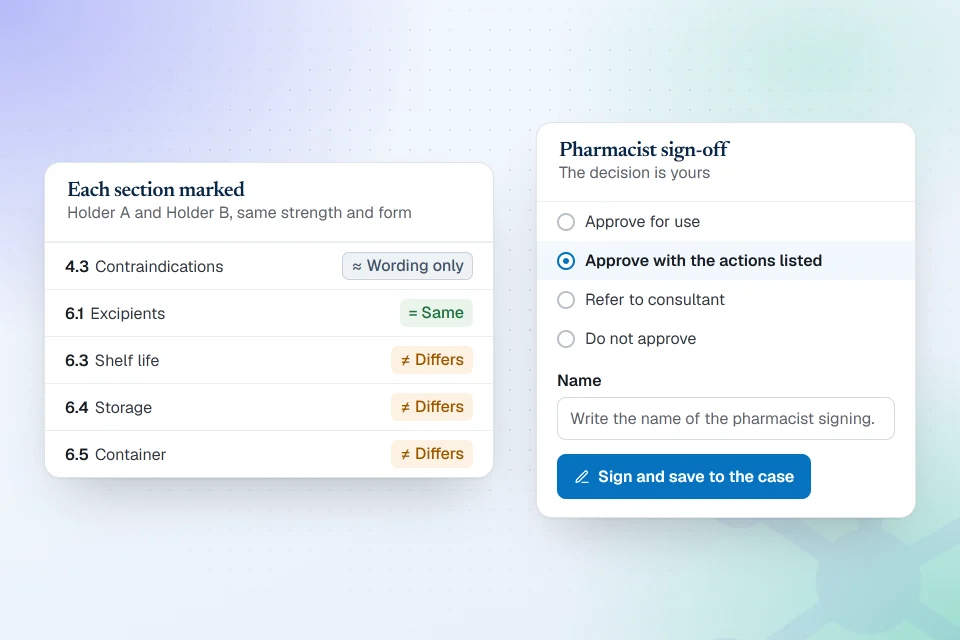
Q2Med lays the short product's SPC beside the option's, one section at a time, and brings a long section down to the few sentences that differ. The comparison marks each section. You record a decision on each section and sign the outcome into the case.

When a shortage means moving to another licence holder's product, someone has to read two SPCs against each other. Q2Med does the reading side by side and shows where they part, so the pharmacist's time goes on the decision.
One step for each section
The review walks through twelve SPC sections in order, from composition and posology to shelf life, storage and the container, with both SPCs on screen.
- Side by sideThe short product on the left, the option on the right, both from the HPRA register.
- Products and sources firstThen each section, then pack and safety, then sign-off.
- Show differences onlyOne switch hides the rows where nothing changes in substance.
Down to the sentence and the word
A posology section can run to thousands of characters. Q2Med lines the two texts up sentence by sentence, folds away the runs that read the same, and highlights the words that differ in the rest.
- Same sentences foldedThree or more sentences that read the same fold into one line you can open.
- Words highlightedInside each sentence that differs, the changed words are marked.
- Read the full text any timeNothing is hidden for good. Every fold opens back to the SPC's own words.
Q2Med reads each changed section with you
As soon as the review opens, Q2Med reads the sections that changed and says what changed in meaning, one section at a time, starting with the one on screen.
- An amber caution where it mattersWhen the wording check sees only a change of words but the reading finds a change in meaning, the section carries a caution.
- The reading never changes a markThe marks come from a word-for-word comparison, not from a model. The decision on each section, and the outcome, are the pharmacist's.
- Every reading carries a warningEach reading says it can make mistakes and should be checked against the SPC text.
Marks that say what is really there
Each section gets one of six marks: Same, Wording only, Differs, Not in one SPC, Neither SPC states this, or Could not be read.
- Wording only is not a differenceWhen two sections differ only in product names, punctuation or filler words, the mark is Wording only, shown in grey. A real Differs is shown in amber, so the differences that matter stand out.
- Missing is never SameA section missing from one SPC is marked as missing.
- Only this product's SPCQ2Med never shows another product's text. When there is no SPC for an option, the review says so.
Signed, and saved to the case
The pharmacist chooses the outcome, writes their name and signs. The whole review, as signed, is saved to the case activity.
- Four outcomesApprove for use, approve with the actions listed, refer to consultant, or do not approve. Each is recorded.
- Refer to a consultantThe outcome is recorded. From the case, you ask a named consultant with a Q2Med account at your site to review it.
- Then the technician checklistA short checklist for the technician follows the signed review.
The rest of Q2Med
See one shortage worked from first alert to resolved.
Talk to the team, or pick a time for a walkthrough.